Moonwalk
Important Note
For Moonwalk to work you need to set your in-game sense high enough to turn your camera before the game registers your camera angle. This way you can run while facing backwards. Attached are some preset in-game and Zen sensitivity settings to get you started.
** Moonwalk & Ice Slide Setup Tutorial (Cronus Zen)
Run backward in style with toggle activation, auto-turn options, and aim-smart stopping!
Preset Moonwalk Values
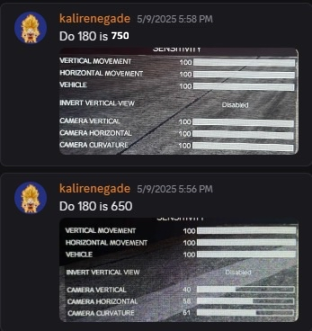
These are some working examples based on in-game settings:
Do 180 = 750
- Vertical Movement:
100 - Horizontal Movement:
100 - Vertical Camera:
100 - Horizontal Camera:
100 - Camera Curvature:
100
Do 180 = 650
- Vertical Movement:
100 - Horizontal Movement:
100 - Vertical Camera:
40 - Horizontal Camera:
58 - Camera Curvature:
61
Fine-tune
Do 180depending on how sharp you want the auto-turn to be. Higher values = more spin.
Step 1: Select the Moonwalk Script
- Open the Zen OLED Menu on your controller. (L2+Options on PS, LT+Menu on XBOX)
- Navigate to Programs. (using the left/right arrow dpads)
- Select Moonwalk. (scroll though the programs with the up/down arrow dpads)
- Press the PS Button or XBOX Button to save.
Step 2: Activate Moonwalk In-Game
- Press and hold D-Pad Down (↓) for 1 second.
- This activates Auto-Moonwalk, making your character slide backward.
Step 3: Stop Moonwalking
- Moonwalk can be stopped in one of two ways:
- By manually moving backward, or
- By pressing D-Pad Down (↓) again to toggle the feature off.
Mode
- Moonwalk and iceslide have been combined into one menu.
- Select the mode you want to use weateher its Moonwalk or iceslide
- You will notice there are also numebers under the mode once you move past Moonwalk and iceslide these are the moonwalk/iceslide custom speeds. by setting a custom speed you can tweek how fast you turn left/right Moonwalk has a speed of 100 while iceslide has a speed of 200.
You can play around with the mode speed to get diffrent effects just remember that not all speeds will have a sucessfull outcome. a speed to low or high may fail to moonwalk or iceslide
Optional: Stop on Aim
- Go to the Moonwalk program from the menu and click X (on PS) or A (on Xbox) to enter the sub menu.
- Enable StopOnAim” .
- Now, Moonwalk automatically stops when you aim your gun.
Perfect for regaining full control in combat!
Optional: Auto-Turn with Do 180 Setting
You can adjust how far you turn when activating Moonwalk using the Do 180 setting:
- Set a positive value (e.g.
Do 180 = 750) to automatically turn left by a specific amount. - Set
Do 180 = 0to disable auto-turn — you’ll need to turn left manually before pressing D-Pad Down. - Set
Do 180 = -1to manually turn right and press D-Pad Down (Moonwalk only).
A minimum movement speed is required for consistent activation.
Optional: Fine-Tuning
After testing, tweak your setup via Zen Studio or in-game menu:
- Adjust Moonwalk speed
- Tune Do 180 value for turn distance
- Try different Ice Slide patterns
- Configure toggle behavior and other advanced settings
You’re All Set!
Press D-Pad Down to activate Moonwalk.
Press again to stop. Slide in style with full control!